


I spent 30 years watching business owners drown in the exact same tasks their competitors somehow escaped. The mystery wasn't effort—everyone was working hard. The mystery was where the time went.
Here's what finally clicked for me: the average professional spends 4.1 hours a day managing email. That's more than half a standard workday, gone before any real work happens. Add in scheduling, follow-ups, and the constant app-switching that drains another 20-30% of productivity, and suddenly the math makes sense. Your competitor isn't working harder. They've got software handling the busywork while they focus on revenue.
The thing is, 'AI virtual assistant' has become one of those phrases that means everything and nothing. Some tools just answer typed questions. Others handle phone calls. Some connect to your calendar and email; others live in a silo. In a minute, I'll show you the integration trap that catches most businesses—but first, let's get clear on what these tools actually do.
What Is an AI Virtual Assistant (And What It Actually Does)?
An AI virtual assistant is software that handles tasks automatically—scheduling meetings, answering questions, managing email, following up with leads—without you supervising every step. The key difference from older chatbots: modern AI assistants understand context and can hold real conversations, not just spit out pre-programmed answers.
According to research on AI implementation, an AI-powered virtual assistant differs from a traditional chatbot because it handles conversations in real-time with natural, human-like responses rather than following a rigid script. When a customer asks about your hours, then immediately follows up asking about pricing, the AI remembers the context and responds appropriately.
The practical impact? Teams using AI tools multiple times daily save up to 26 minutes per day—which adds up to two full weeks annually. That's two weeks you could spend on growth instead of inbox management.
Digital voice assistants have now reached 8.4 billion active devices worldwide, which actually exceeds the global population. This isn't emerging technology anymore. It's table stakes.
Three Types of AI Assistants—And Which One Fits Your Business
Not all AI virtual assistants solve the same problems. The market has split into three distinct categories, and choosing the wrong type is the fastest way to waste money.
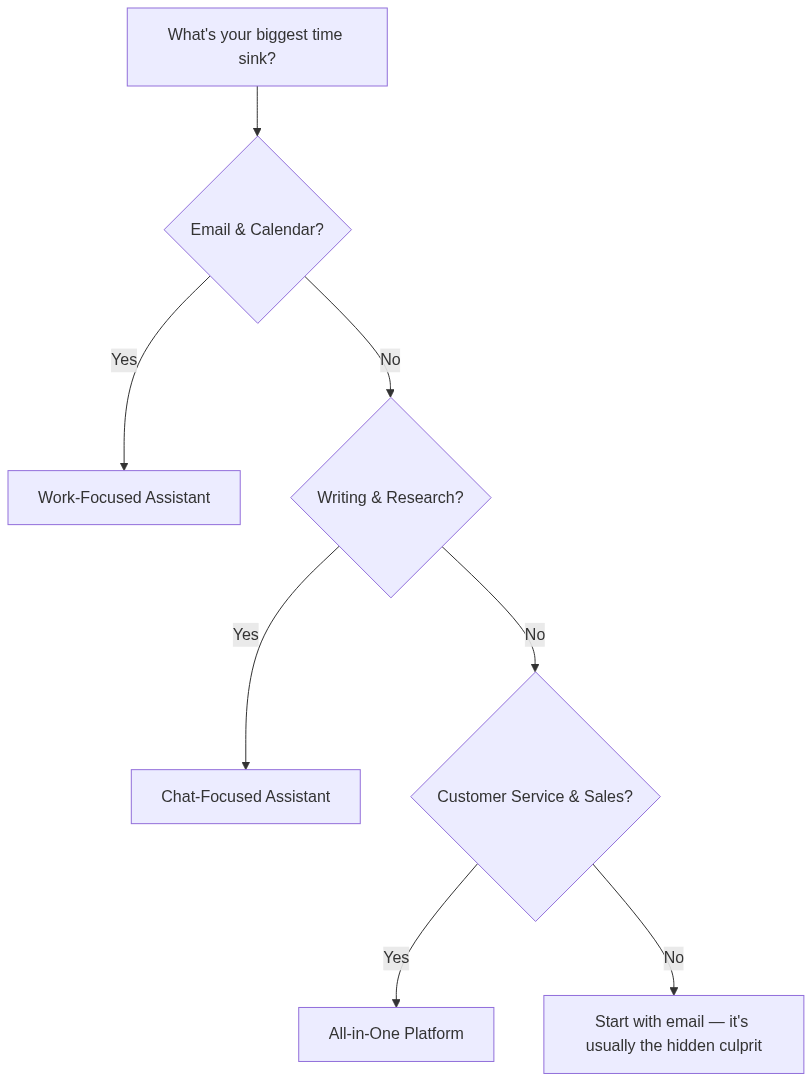
- **Work-focused assistants** integrate with your productivity tools—calendars, email, task managers. They schedule meetings, draft responses, and manage workflows. Best for: businesses drowning in administrative overhead.
- **Chat-focused assistants** like ChatGPT and Claude excel at writing, brainstorming, and answering complex questions. They're powerful thinking partners but don't connect to your business systems. Best for: knowledge workers who need help with content and analysis.
- **All-in-one platforms** combine both capabilities plus business automation—connecting to your CRM, handling customer inquiries, triggering workflows. Best for: businesses ready for deeper operational transformation.
The mistake I see constantly: business owners buy a chat-focused assistant expecting it to manage their calendar. Or they get an all-in-one platform when all they needed was help drafting emails. Match the tool to your actual pain point.
The Integration Trap Nobody Warns You About

Here's the counterintuitive truth that took me years to learn: the most powerful AI assistant is worthless if it doesn't connect to your existing tools.
Business owners get seduced by impressive demos. The AI answers questions brilliantly. It writes beautifully. Then they buy it, and nothing changes—because the assistant lives in its own app, completely disconnected from the calendar, email, and CRM where actual work happens.
When evaluating an AI virtual assistant, the research is clear: prioritize integration with your existing workflow over features. A basic assistant that connects to your calendar, email, and customer database will outperform a sophisticated one that requires manual copy-paste.
The other overlooked factor: memory and context awareness. Can the assistant remember what you discussed yesterday? Can it learn your preferences over time? A virtual assistant AI that forgets everything between sessions creates more work, not less.
How to Evaluate an AI Virtual Assistant Before You Buy
With 60-80% of executives actively seeking new productivity tools, vendors know you're looking. That means aggressive demos and promises. Here's how to cut through the noise.
The evaluation framework I use with every AI tool purchase:
- **Integration test:** Connect it to your actual calendar and email. Send it a real scheduling request. If setup takes more than 30 minutes, that's a red flag.
- **Context test:** Have a conversation, close the app, come back the next day. Does it remember? If you have to re-explain your business every session, it's a glorified search engine.
- **Escalation test:** Ask it something it can't answer. Does it admit confusion and offer to escalate, or does it hallucinate an answer? The best AI virtual assistants know their limits.
- **Privacy audit:** Where does your data go? For healthcare, legal, or financial businesses, GDPR and HIPAA compliance isn't optional. Most vendors bury this in terms of service.
The privacy question matters more than most businesses realize. Your customer data, email contents, and business communications will flow through this system. If you're in a regulated industry, compliance failures can cost more than the productivity gains.
What Goes Wrong When Setup Gets Rushed
Last year, I watched a client deploy an AI-powered virtual assistant on Friday afternoon. By Monday, their team had already abandoned it. Not because the tool was bad—but because nobody defined what 'success' meant.
The assistant was answering customer emails. But it was answering them wrong—using a tone that didn't match the brand, making promises the team couldn't keep. Three days of cleanup work erased any time savings.
The pattern repeats across industries: hire virtual assistants—whether human or AI—without clear guardrails, and you create more problems than you solve. The tool needs training data, example responses, and explicit rules about what it can and can't do.
Your First Week With an AI Virtual Assistant
The businesses that get real value from AI assistants follow a specific rollout pattern. Here's what your first seven days should look like:
- **Day 1: Connect one tool only.** Start with email or calendar—whichever causes more daily pain. Skip the urge to connect everything at once.
- **Day 2: Feed it examples.** Show the assistant 10-15 examples of how you actually respond to common requests. 'Here's how I decline meetings.' 'Here's my tone for customer complaints.'
- **Day 3-4: Shadow mode.** Have the assistant draft responses, but review everything before it sends. Catch the mistakes early.
- **Day 5: First live test.** Let it handle 3-5 low-stakes interactions without your review. Check results the next morning.
- **Day 6-7: Expand or adjust.** If accuracy is above 90%, connect a second tool. If below, feed it more examples and extend shadow mode.
The research backs this graduated approach: e-commerce brands using virtual assistants properly can handle roughly 35% more orders without growing headcount. But 'properly' is the key word. The ones who rush report the opposite—more complaints, not fewer.
The Tradeoffs You Need to Accept

No AI assistant is perfect. Before you commit, understand what you're signing up for:
- **Learning curve is real.** Even the best AI virtual assistant needs 2-3 weeks of correction before it matches your style. Budget time for training, not just setup.
- **Hallucination risk exists.** AI can make up information that sounds confident and true. For customer-facing tasks, you need verification protocols—especially for pricing, policies, and deadlines.
- **Vendor lock-in happens fast.** Once your workflows depend on a specific tool, switching costs spike. Evaluate long-term pricing and export options before you're dependent.
- **Privacy isn't automatic.** Your data trains these systems. If confidentiality matters, verify data handling policies in writing. 'We take privacy seriously' means nothing without specifics.
- **Human oversight stays necessary.** AI virtual assistants handle 60-80% of routine tasks well. The edge cases—angry customers, complex negotiations, unusual requests—still need human judgment.
Signs Your AI Assistant Is Actually Working
After two weeks, you should see measurable changes. If you don't, something's wrong with the setup—not the technology.
- **Email response time drops by 50% or more.** If your average was 4 hours, it should be under 2.
- **Calendar conflicts decrease.** The assistant should catch double-bookings before they happen.
- **You're checking fewer apps.** The whole point is consolidation. If you're still bouncing between 6 tools, the integration isn't working.
- **Your team stops asking you routine questions.** The assistant should handle 'What time is the meeting?' and 'Did you get my email?' without human involvement.
- **You have documentation.** Good AI assistants create logs—who asked what, how it responded, what it escalated. If you can't audit its work, you can't trust its work.
The research shows hiring virtual assistants can cut operations costs by up to 78% and free up an extra 13-15 hours per week for business owners. But those numbers come from businesses that measured, adjusted, and optimized. Set baselines before you start so you can actually track the improvement.
What This Means for Your 2026 Operations
Here's your action plan for the next 7 days:
- **Audit your time leaks today.** Track where your hours actually go for 48 hours. Most business owners guess wrong—email usually eats 40%+ more time than they estimate.
- **Identify your single biggest pain point.** Is it email, scheduling, customer inquiries, or follow-ups? Pick one. If you're unsure, start with email—small business owners spend 32% of their week on administrative work, and email is usually the largest chunk.
- **Match pain point to assistant type.** Work-focused for calendar/email, chat-focused for writing/analysis, all-in-one for customer operations. Don't buy features you won't use.
- **Run the integration test first.** Before evaluating any other feature, confirm it connects to your existing tools in under 30 minutes. If it doesn't, move on.
- **Budget $50-200/month to start.** Most AI virtual assistants offer tiered pricing. Start with the basic tier that includes your critical integrations. Upgrade only after you've proven value.
- **Plan for a 2-week training period.** Block 15-30 minutes daily for the first two weeks to review outputs and correct mistakes. The upfront investment pays off in accuracy.
Search interest in AI virtual assistant solutions has exploded by 900% year-over-year. Your competitors are already figuring this out. The question isn't whether to adopt—it's whether you'll do it well or waste money on tools that don't fit.
For a deeper dive into choosing between specific tools, I covered the decision framework in my guide to AI email assistants for small business. And if you're considering broader automation beyond assistants, the n8n vs Zapier vs Make comparison breaks down the workflow automation landscape.
Common Questions About AI Virtual Assistants
How much does an AI virtual assistant cost?
Most AI-powered virtual assistants run $20-200/month for small business use. Work-focused assistants like calendar and email managers typically cost $10-50/month. All-in-one platforms with CRM integration and customer service capabilities range $100-300/month. Compare this to the 13-15 hours per week they can free up—at any reasonable hourly rate, the ROI is clear within the first month.
Will an AI assistant replace my human virtual assistant?
For routine tasks—yes, increasingly. AI handles scheduling, email triage, and standard customer inquiries faster and cheaper than humans. But human VAs still excel at judgment calls, relationship management, and creative problem-solving. The smart play is using AI for volume and humans for complexity. Many businesses use both, with AI handling 60-80% of routine work and humans managing escalations.
How long does it take to set up an AI virtual assistant?
Basic setup takes 30-60 minutes for most tools. But effective setup—where the assistant actually matches your voice and handles tasks correctly—takes 2-3 weeks of active training. Plan for 15-30 minutes daily during that period to review outputs, correct mistakes, and feed examples. Rushed setups lead to abandoned tools.
What's the difference between an AI assistant and a chatbot?
Traditional chatbots follow pre-programmed scripts—they can only answer questions you've specifically anticipated. AI virtual assistants understand context, learn from interactions, and handle conversations they've never seen before. When a customer asks an unexpected follow-up question, a chatbot fails; an AI assistant adapts. The practical difference: chatbots handle FAQs, AI assistants handle conversations.
Is my business data safe with an AI virtual assistant?
It depends entirely on the vendor. Before signing up, verify: Where is data stored? Who can access it? Is the system compliant with GDPR, HIPAA, or other regulations that apply to your industry? Some assistants train their models on your data—meaning your business information could inform responses to other users. Look for explicit opt-out options and data deletion policies.
Sources
- Sybrid - The 2026 Guide to Business Growth with AI Virtual Assistants
- BuiltABot - AI Virtual Agent Business Implementation Guide
- IsometrikAI - AI Virtual Assistant for Small Business
- Myma.ai - Why Every Brand Needs an AI Virtual Assistant in 2026
- Arahi - Which Personal AI Assistant Should You Choose
- Gmelius - Best AI Assistants for Email Productivity
- OpenAI - A Practical Guide to Building Agents


